Installation
localWiki is a native desktop app distributed as a standalone installer for each platform. No runtime dependencies are required.
Download
| Platform | Format | Link |
|---|---|---|
| Windows (x64) | .exe (NSIS installer) | Download for Windows |
| macOS (Apple Silicon) | .dmg | Download for macOS ARM64 |
| macOS (Intel) | .dmg | Download for macOS x64 |
| Linux (x64) | .AppImage | Download for Linux |
macOS has two separate downloads: one for Apple Silicon (M1/M2/M3/M4) and one for Intel Macs. Choose the variant that matches your hardware. You can check by clicking the Apple menu and selecting About This Mac.
Install on Windows
Download the .exe installer
Run the downloaded localWiki-Setup-x.x.x.exe file.
Handle SmartScreen warning
Windows SmartScreen may show an “Unknown publisher” warning. Click More info, then Run anyway. This happens because the binary is not yet EV code-signed.
Complete the installer
Follow the NSIS installer prompts. The default install location is C:\Users\<you>\AppData\Local\localWiki.
Launch localWiki
Open localWiki from the Start Menu or desktop shortcut.
Windows SmartScreen warnings are expected for new applications without an Extended Validation certificate. The installer is safe — you can verify the checksum on the download page.
Install on macOS
Download and open the .dmg
Double-click the downloaded .dmg file and drag localWiki into your Applications folder.
Handle Gatekeeper warning
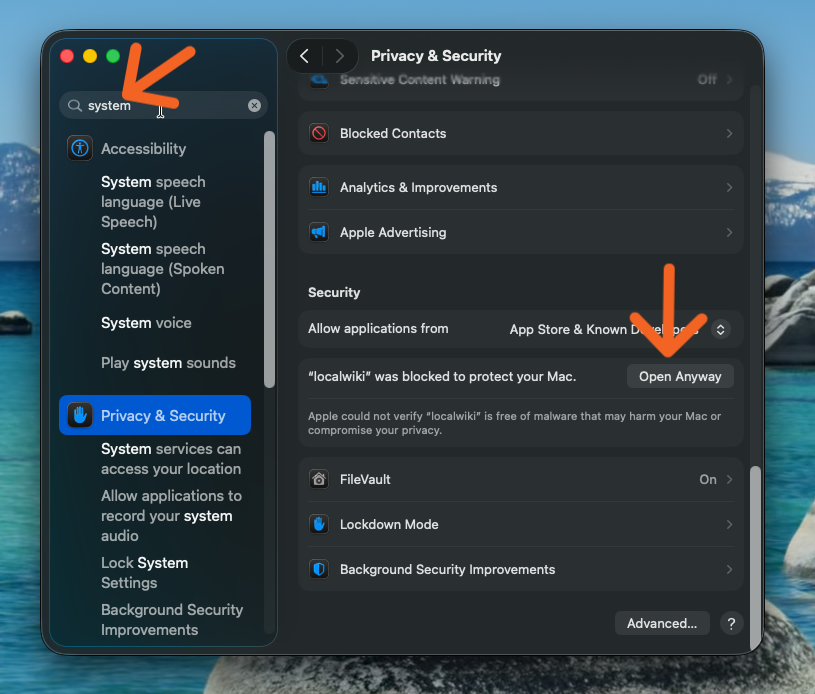
macOS will block localWiki on first launch because it’s not from the App Store. Go to System Settings → Privacy & Security, scroll down to the Security section, and click Open Anyway next to the localWiki blocked message.
If you see “app is damaged” error
Some macOS versions add a quarantine flag that shows a misleading “damaged” error. To fix it, open Terminal and run:
xattr -c /Applications/localWiki.appThis removes the quarantine attribute. After running this command, launch localWiki normally from Applications.
Launch localWiki
Open localWiki from your Applications folder or Spotlight search.
The Gatekeeper warning is expected for applications distributed outside the App Store. localWiki is safe — your vault is encrypted with AES-256-GCM and never leaves your device.
Install on Linux
Linux is distributed as an .AppImage only (x64). No .deb package is currently provided.
chmod +x localWiki-x.x.x.AppImage
./localWiki-x.x.x.AppImage